Controls, flight assist, SAS and autopilot
Input (category 08)
RFM reads the normal Reforger helicopter actions (collective up and down, cyclic, anti-torque). Analog Input (on by default) treats them as axis positions from a joystick or HOTAS. With it off they act like buttons, and Collective Rate, Control Rate and Control Centring set how fast the controls move and re-centre.
Two things that look like bugs but aren't: Reforger reports an untouched collective as 0.5, and non-centring hardware stays wherever you left it. Both are normal.
AI can't fly RFM aircraft. Vanilla AI can't fly helicopters either.
Flight assist (10D): keyboard, mouse and gamepad
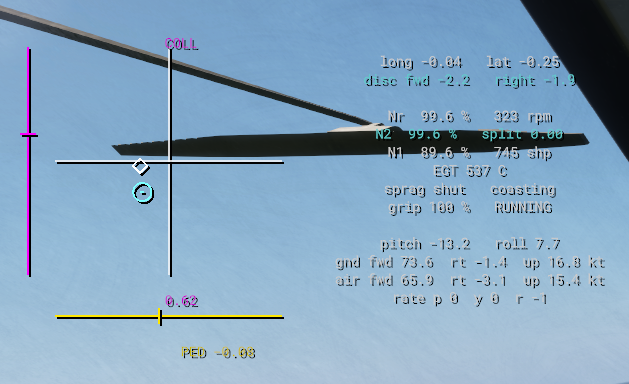
Players pick their device in the game settings (Settings > RFM > Control device). Keyboard, Keyboard + Mouse and Gamepad fly through the flight assist. Joystick/HOTAS flies the controls directly, unless the player turns the assist on for it. The assist moves the same cyclic, pedals and collective a pilot would, so nothing changes in the physics underneath.
| Player input | What the assist does |
|---|---|
| W/A/S/D held | Pitches or banks at Assist Max Rate Deg S, no angle limit. Let go and it holds whatever angle it's at. A tap is a small nudge. |
| Q/E (pedals) | Turns the nose at up to the yaw rate. Let go and it holds the heading. On gamepad it also coordinates turns at speed. |
| Shift/Ctrl (collective) | Climbs or descends at up to Assist Max Climb MS / Assist Max Descent MS. Let go and it holds the height. |
| C (vanilla autohover key) | From any speed, brings the aircraft to a hover at the height it was pressed and holds it over that spot. In strong wind it turns the nose into the wind. C again or touching the cyclic cancels it. |
| On the ground | The cyclic finds the hover position by itself, so the aircraft lifts straight up. |
It also looks after the rotor. It keeps rotor load above 0.5 g so a teetering rotor doesn't get unloaded, backs off the cyclic near the flap stops, and caps the load at 2 g. A hard pushover with the cyclic can still bump the mast though.
The fields in 10D Flight Assist on the Flight component are per aircraft. The defaults are tuned for the Huey, and every tooltip tells you which way to move it:
| Field | Default | Change it when |
|---|---|---|
| Assist Max Pitch Deg, Assist Max Bank Deg | 20, 30 | You want a different angle at full gamepad stick or mouse |
| Assist Max Rate Deg S | 25 | You want held keys to pitch and roll faster or slower |
| Assist Attitude Seconds | 0.6 s | Lower is snappier, too low and it overshoots |
| Assist Pitch Rate Gain, Assist Roll Rate Gain | 0.025 | Raise it if it feels sluggish, lower it if it wobbles fast. A really responsive aircraft like the AH-6 might want less. |
| Assist Attitude Integral Gain | 0.01 | Raise it if it settles slightly off the angle it should be at |
| Assist Max Yaw Rate Deg S, Assist Yaw Rate Gain, Assist Yaw Integral Gain, Assist Heading Gain | 30, 0.03, 0.05, 1.5 | Pedal response and heading hold |
| Assist Max Climb MS, Assist Max Descent MS | 6, 5 m/s | Collective key climb and descent rates |
| Assist Collective Gain, Assist Collective Integral Gain, Assist Height Hold Gain | 0.1, 1.5, 0.5 | How hard it chases the climb rate and holds height |
| Assist Autohover Deg Per MS | 3 | Nose-up or bank per m/s of ground speed while stopping. Higher reacts faster. |
| Assist Hover Drift Deg Per MS | 2 | Gamepad and HOTAS only, how hard it stops drift with the stick let go |
| Assist Stick Speed | 3 | The fastest it moves the stick, so it never slams the controls |
Before you release a new aircraft, fly it through a lift-off, a held pitch and bank, a turn, and an autohover from speed. With Debug Log on, [RFM-ASSIST] prints the target against the actual for every axis once a second, which makes tuning way easier.
Force trim (09)
Holding the RFM_ForceTrimRelease action moves the cyclic and pedal "centre" to wherever you're holding them, like a real force trim button. Only turn on Force Trim if your aircraft actually has one.
Mixer and kinematics (10)
An optional physical control travel layer. Its pitch fields are written for a main and tail layout. Most aircraft don't need it, since the rotor pitch ranges and control maps do the same job.
Stability augmentation and autopilot (10B)
This is a limited authority system that nudges the controls to hold attitude, heading, altitude or speed. The Mi-8's AP-34B setup is a full example you can copy from.
| What | Fields |
|---|---|
| Master switch | Stability Augmentation |
| Which channels start on | SAS Heading / Roll Pitch / Altitude / Speed Requested |
| How hard each channel works | SAS … Angle Gain Per Deg, SAS … Rate Gain Per Deg S, SAS Altitude Gain Per M, SAS Speed Pitch Reference Deg Per Kmh |
| How much control it's allowed to use | SAS … Authority (fraction of full travel, the Mi-8 uses 0.2) |
| Output direction | SAS … Output Sign (flip it if the SAS pushes the wrong way) |
| Pilot override | Moving the pedals or collective pauses heading or altitude hold on its own (SAS Auto Pedal Contact From Pilot, SAS Auto Collective Release From Pilot) |
| Turning it on with the trim button | With SAS Engage On Trim Release, letting go of Force Trim Release turns on roll/pitch and heading hold (altitude too, with Trim Engages Altitude) at whatever attitude, heading and altitude you're at, and trims the controls there. Press it again any time to set a new reference. A quick double press (Trim Double Press Seconds) turns every channel off and puts the force trim back to where it was before. With SAS Cyclic Contact Recapture On Settle off, moving the stick on purpose frees the attitude reference until the next trim press. The control overlay shows AP ATT/HDG/ALT, plus (free) while the attitude reference is released. A TRIM line shows how far the force trim is holding each axis off centre. The trim is separate from the autopilot, so turning the AP off doesn't clear it. |
| Holds that settle a little off | Heading and altitude hold push harder the further off they are, so they settle a bit off target (a couple of degrees, a couple of metres). Heading Trim Follow Seconds and Altitude Trim Follow Seconds let each one slowly add its own correction until it's back on target. The number is roughly how long that takes. Moving the pedals or collective resets it. 0 = off. |
| Manoeuvring with attitude hold on | SAS Auto Cyclic Contact From Pilot stands in for a trimmer button. Move the cyclic off its trimmed spot for Engage Seconds and roll/pitch hold follows you, keeping only Cyclic Contact Rate Damping Fraction of its damping. Hold the stick steady for Release Dwell Seconds and it holds the new attitude, like a steady bank. Heading Sync Bank Deg stops heading hold from fighting you on the pedals in a banked turn, and it holds whatever heading you roll out on. |
| Tuning flights | While any channel is on, a [RFM-AP-CAL] line prints every Telemetry Interval with each channel's error and how much of its authority it's using (1 = maxed out). |
Cockpit buttons are just normal user actions (the RFM_AP34B…UserAction classes: heading on/off, roll-pitch on, altitude on/off, trim ±1° and all off). Add them to your aircraft's ActionsManagerComponent with your own contexts, positions and labels. Easiest way is to copy the Mi-8's block and rename the UI text.
Hydraulics, servos and manual reversion (11–12)
Optional servo lag, travel, rate and force limits, plus a boost-off mode. They all default to off or unlimited. Having a value in a field doesn't turn the system on, each one has its own enable switch. Don't make up limits. Zero means unlimited.