Axes, units and PointInfos
Every position is in model-local metres, measured from the model's origin:
| Axis | Direction |
|---|---|
| X | Right (positive = pilot's right) |
| Y | Up |
| Z | Forward (positive = towards the nose) |
Units RFM uses:
| Quantity | Unit in RFM | Watch out for |
|---|---|---|
| Mass | kg | |
| Power | watts | 1 shp = 745.7 W, so a 1,400 shp engine is 1,044,000 W. |
| Rotor speed | RPM | |
| Angles | Degrees, except fields whose name or tooltip says radians (like the teetering Flap Stop) | |
| Rotational inertia | kg·m² | 1 slug·ft² = 1.356 kg·m² |
| Springs / dampers | N/m, N·s/m |
There's a full list in Unit conversions.
PointInfos: placing things on the model
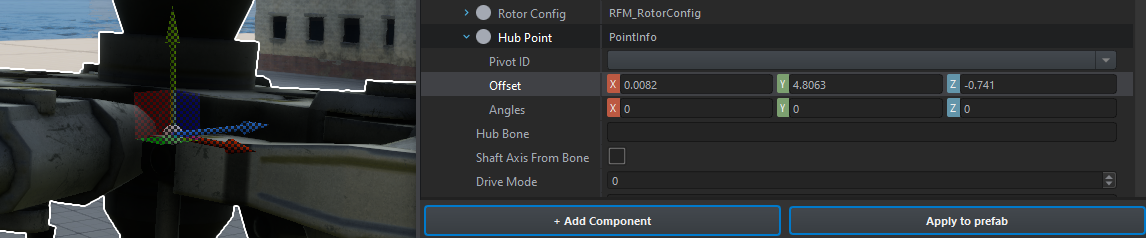
A lot of fields are PointInfos: rotor hubs, the CG, the fuel tank, the fin, landing gear attach points and so on. To set one:
- Click the field and set its class to PointInfo.
- Type in an Offset (model-local metres), or drag the gizmo around in the viewport.
- Or set PivotID to a bone on your model. The Mi-8 uses
v_rotor,v_tail_rotorandv_wheel_F.
If a PointInfo is set, it always beats the older plain vector fields (like m_vFuelPos). PointInfo angles get ignored, except on the fin and stabiliser (where the angle sets which way the surface faces) and on store recoil points.
The edit and test loop
You don't need to restart Workbench for prefab changes:
- Stop playing.
- Edit the prefab and save it.
- Save the world too, otherwise aircraft already placed in it won't pick up the change.
- Hit play again and check the startup log (next page).
Script changes are different. Once the scripts are updated and recompiled, close the World Editor and open it again. The world won't run the new script code until you do.